
Status line là một thanh tuỳ chỉnh ở đáy Claude Code, chạy bất kỳ shell script nào bạn cấu hình. Nó nhận dữ liệu phiên dạng JSON qua stdin và hiển thị bất cứ gì script của bạn in ra - cho bạn một góc nhìn thường trực về context usage, chi phí, trạng thái git, hoặc bất cứ thứ gì khác bạn muốn theo dõi.
Status line hữu ích khi bạn:
- Muốn theo dõi context window usage trong lúc làm việc
- Cần track chi phí phiên
- Làm việc với nhiều phiên cùng lúc và cần phân biệt chúng
- Muốn branch và trạng thái git luôn hiển thị
Status line render trên hàng riêng, phía trên các badge footer có sẵn, không thay thế chúng. Để thêm badge link có thể click vào footer khi một ID xuất hiện trong hội thoại mà không cần viết script, cấu hình footerLinksRegexes thay vào đây.
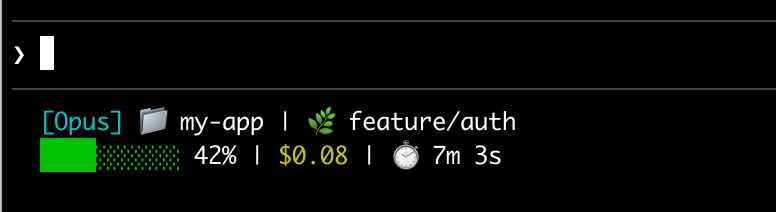
Dưới đây là ví dụ status line nhiều dòng hiện thông tin git ở dòng đầu và một context bar có màu ở dòng hai.
Thiết lập status line
Phần tiêu đề “Thiết lập status line”Dùng lệnh /statusline để Claude Code tự sinh script cho bạn, hoặc tự tạo script và thêm vào settings.
Dùng lệnh /statusline
Phần tiêu đề “Dùng lệnh /statusline”Lệnh /statusline nhận hướng dẫn bằng ngôn ngữ tự nhiên mô tả bạn muốn hiển thị gì. Claude Code sinh một file script trong ~/.claude/ và tự cập nhật settings:
/statusline show model name and context percentage with a progress barĐồng ý các prompt sửa file nếu Claude Code hỏi quyền trong lúc setup.
Cấu hình thủ công status line
Phần tiêu đề “Cấu hình thủ công status line”Thêm field statusLine vào settings người dùng (~/.claude/settings.json, ~ là thư mục home) hoặc settings dự án. Đặt type là "command" và trỏ command tới đường dẫn script hoặc một lệnh shell inline. Xem walkthrough đầy đủ ở Xây status line từng bước.
{ "statusLine": { "type": "command", "command": "~/.claude/statusline.sh", "padding": 2 }}command chạy trong shell, nên bạn cũng có thể dùng lệnh inline thay vì file script. Ví dụ này dùng jq để parse JSON input và hiện tên model cùng context percentage:
{ "statusLine": { "type": "command", "command": "jq -r '\"[\\(.model.display_name)] \\(.context_window.used_percentage // 0)% context\"'" }}Field padding (tuỳ chọn) thêm khoảng cách ngang (theo số ký tự) cho nội dung status line. Mặc định 0. Padding này cộng thêm vào khoảng cách sẵn có của giao diện, nên nó điều chỉnh thụt lề tương đối chứ không phải khoảng cách tuyệt đối tới mép terminal.
Field refreshInterval (tuỳ chọn) chạy lại command của bạn mỗi N giây, ngoài các cập nhật theo sự kiện. Tối thiểu là 1. Đặt field này khi status line hiện dữ liệu theo thời gian như đồng hồ, hoặc khi subagent background đổi trạng thái git trong lúc phiên chính đang idle. Để trống nếu chỉ muốn chạy theo sự kiện.
Field hideVimModeIndicator (tuỳ chọn) ẩn text -- INSERT -- mặc định dưới prompt. Đặt true khi script của bạn tự render vim.mode, để tránh hiện trùng lặp.
Tắt status line
Phần tiêu đề “Tắt status line”Chạy /statusline và yêu cầu xoá/gỡ status line (ví dụ /statusline delete, /statusline clear, /statusline remove it). Bạn cũng có thể tự xoá field statusLine khỏi settings.json.
Xây status line từng bước
Phần tiêu đề “Xây status line từng bước”Walkthrough này cho thấy cơ chế bên dưới bằng cách tự tạo một status line hiện model hiện tại, thư mục làm việc, và phần trăm context window đã dùng.
Các ví dụ dưới dùng Bash, chạy trên macOS và Linux. Trên Windows, xem Cấu hình Windows cho ví dụ PowerShell và Git Bash.
-
Tạo script đọc JSON và in output
Claude Code gửi dữ liệu JSON tới script của bạn qua stdin. Script này dùng
jq, một trình parse JSON dòng lệnh bạn có thể cần cài, để lấy tên model, thư mục, và phần trăm context, rồi in ra một dòng đã format.Lưu vào
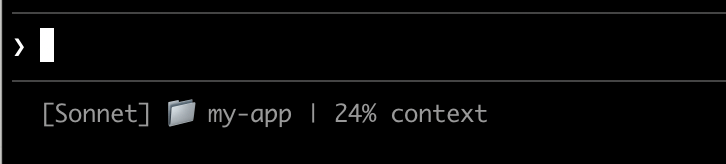
~/.claude/statusline.sh(~là thư mục home, ví dụ/Users/usernametrên macOS hoặc/home/usernametrên Linux):#!/bin/bash# Đọc dữ liệu JSON Claude Code gửi qua stdininput=$(cat)# Trích field bằng jqMODEL=$(echo "$input" | jq -r '.model.display_name')DIR=$(echo "$input" | jq -r '.workspace.current_dir')# "// 0" là fallback nếu field nullPCT=$(echo "$input" | jq -r '.context_window.used_percentage // 0' | cut -d. -f1)# In status line - ${DIR##*/} chỉ lấy tên thư mụcecho "[$MODEL] 📁 ${DIR##*/} | ${PCT}% context" -
Cấp quyền thực thi
Terminal window chmod +x ~/.claude/statusline.sh -
Thêm vào settings
Báo Claude Code chạy script của bạn làm status line. Thêm vào
~/.claude/settings.json, đặttypelà"command"(nghĩa là “chạy shell command này”) và trỏcommandtới script:{"statusLine": {"type": "command","command": "~/.claude/statusline.sh"}}Status line xuất hiện ở đáy giao diện. Settings tự reload, nhưng thay đổi chỉ hiện ở lần tương tác kế tiếp với Claude Code.
Cách status line hoạt động
Phần tiêu đề “Cách status line hoạt động”Claude Code chạy script của bạn và pipe dữ liệu phiên JSON vào qua stdin. Script đọc JSON, trích thứ nó cần, và in text ra stdout - Claude Code hiển thị đúng thứ script in ra.
Khi nào nó cập nhật
Script chạy một lần khi phiên bắt đầu, kể cả khi bạn resume. Sau đó, nó chạy lại khi:
- Một tin nhắn assistant mới đến
/compacthoàn tất- Permission mode đổi
- Vim mode bật/tắt
- Timer
refreshIntervaltrôi qua, nếu bạn đã đặt
(Trước v2.1.216, resume một phiên chạy command hai lần liên tiếp, nên kết quả đầu có thể nhấp nháy trước khi bị thay thế.)
Claude Code debounce update ở 300ms, nên các thay đổi dồn dập gộp lại và script chỉ chạy một lần sau khi thay đổi dừng lại. Nếu một update mới kích hoạt trong khi script còn đang chạy, Claude Code huỷ script đang chạy dở. Nếu bạn sửa script, thay đổi chỉ hiện ở lần trigger update kế tiếp.
Các trigger theo sự kiện có thể im ắng khi phiên chính đang idle, ví dụ khi một coordinator đang chờ subagent background. Để giữ các đoạn dựa trên thời gian hoặc nguồn ngoài luôn cập nhật trong lúc idle, đặt refreshInterval để chạy lại command theo timer cố định.
Script của bạn có thể output gì
- Nhiều dòng: mỗi lệnh
echo/printhiện thành một hàng riêng. Xem ví dụ multi-line. - Màu sắc: dùng mã ANSI escape như
\033[32mcho màu xanh lá (terminal phải hỗ trợ). Xem ví dụ git status. - Link: dùng OSC 8 escape sequence để text có thể click (Cmd+click trên macOS, Ctrl+click trên Windows/Linux). Yêu cầu terminal hỗ trợ hyperlink như iTerm2, Kitty, hoặc WezTerm. Xem ví dụ link có thể click.
Điều chỉnh output theo kích thước terminal
Claude Code capture output script thay vì kết nối trực tiếp tới terminal, nên tput cols và các cách detect độ rộng ở cấp ngôn ngữ không đọc được kích thước terminal từ trong script. Từ v2.1.153, đọc biến môi trường COLUMNS và LINES thay vào đó - Claude Code đặt hai biến này bằng kích thước terminal hiện tại trước khi chạy script của bạn.
Dữ liệu khả dụng
Phần tiêu đề “Dữ liệu khả dụng”Claude Code gửi các field JSON sau tới script của bạn qua stdin:
| Field | Mô tả |
|---|---|
model.id, model.display_name | Định danh và tên hiển thị của model hiện tại |
cwd, workspace.current_dir | Thư mục làm việc hiện tại. Cả hai field cùng giá trị; workspace.current_dir được ưu tiên để nhất quán với workspace.project_dir |
workspace.project_dir | Thư mục Claude Code được khởi chạy, có thể khác cwd nếu thư mục làm việc đổi trong phiên |
workspace.added_dirs | Các thư mục bổ sung được thêm qua /add-dir hoặc --add-dir. Mảng rỗng nếu chưa thêm gì |
workspace.git_worktree | Tên git worktree khi thư mục hiện tại nằm trong một linked worktree tạo bằng git worktree add. Không có ở main working tree. Xuất hiện cho mọi git worktree, khác với worktree.* chỉ áp dụng cho phiên --worktree |
workspace.repo.host, workspace.repo.owner, workspace.repo.name | Định danh repository parse từ remote origin, ví dụ "github.com", "anthropics", "claude-code". Không có nếu ngoài git repository hoặc không cấu hình remote origin |
cost.total_cost_usd | Chi phí phiên ước tính bằng USD, tính ở phía client. Có thể khác hoá đơn thật. Reset về $0 khi /clear bắt đầu phiên mới (từ v2.1.211) |
cost.total_duration_ms | Tổng thời gian thực tế (wall-clock) kể từ khi phiên bắt đầu, tính bằng mili-giây |
cost.total_api_duration_ms | Tổng thời gian chờ phản hồi API, tính bằng mili-giây |
cost.total_lines_added, cost.total_lines_removed | Số dòng code đã thay đổi |
context_window.total_input_tokens, context_window.total_output_tokens | Số token đang có trong context window, từ API response gần nhất. Input gồm cả cache read/write. (Trước v2.1.132, đây là tổng cộng dồn cả phiên) |
context_window.context_window_size | Kích thước context window tối đa, tính bằng token. 200000 mặc định, hoặc 1000000 với model có extended context |
context_window.used_percentage | Phần trăm context window đã dùng, tính sẵn |
context_window.remaining_percentage | Phần trăm context window còn lại, tính sẵn |
context_window.current_usage | Số token từ lần gọi API gần nhất, mô tả ở các field context window |
exceeds_200k_tokens | Tổng số token (input, cache, output cộng lại) từ API response gần nhất có vượt 200k không. Đây là ngưỡng cố định, không phụ thuộc kích thước context window thực tế |
fast_mode | Fast mode có đang bật cho phiên không |
effort.level | Reasoning effort hiện tại (low, medium, high, xhigh, hoặc max). Phản ánh giá trị live của phiên, kể cả khi đổi bằng /effort giữa chừng. Ultracode không phải một level riêng, báo là xhigh. Không có nếu model hiện tại không hỗ trợ tham số effort |
thinking.enabled | Extended thinking có đang bật cho phiên không |
rate_limits.five_hour.used_percentage, rate_limits.seven_day.used_percentage | Phần trăm rate limit 5 giờ hoặc 7 ngày đã dùng, từ 0 đến 100 |
rate_limits.five_hour.resets_at, rate_limits.seven_day.resets_at | Unix epoch giây khi rate limit 5 giờ hoặc 7 ngày reset |
session_id | Định danh phiên duy nhất |
session_name | Tên phiên. Dùng tên tuỳ chỉnh đặt bằng flag --name hoặc /rename nếu có, nếu không thì dùng tiêu đề phiên do AI sinh. Tên hiển thị mặc định, ví dụ my-app-3f, không điền vào field này. Không có nếu phiên chưa có tên tuỳ chỉnh lẫn tiêu đề AI sinh |
prompt_id | UUID định danh user prompt đang được xử lý. Khớp với attribute prompt.id trên OpenTelemetry events. Không có cho tới input đầu tiên của user (yêu cầu v2.1.196 trở lên) |
transcript_path | Đường dẫn tới file transcript hội thoại |
version | Phiên bản Claude Code |
output_style.name | Tên output style hiện tại |
vim.mode | Vim mode hiện tại (NORMAL, INSERT, VISUAL, hoặc VISUAL LINE) khi vim mode đang bật |
agent.name | Tên agent khi chạy với flag --agent hoặc settings agent được cấu hình |
pr.number, pr.url | Pull request đang mở cho branch hiện tại. Phản ánh badge PR ở status bar dưới cùng. Không có cho tới khi tìm thấy PR, khi không ở trong git repository, hoặc sau khi PR merge/close |
pr.review_state | Trạng thái review của PR đang mở: approved, pending, changes_requested, hoặc draft. Có thể không có ngay cả khi pr có mặt |
worktree.name | Tên worktree đang active. Chỉ có trong phiên --worktree |
worktree.path | Đường dẫn tuyệt đối tới thư mục worktree |
worktree.branch | Tên git branch cho worktree (ví dụ "worktree-my-feature"). Không có với worktree tạo qua hook |
worktree.original_cwd | Thư mục Claude đang ở trước khi vào worktree |
worktree.original_branch | Git branch đã checkout trước khi vào worktree. Không có với worktree tạo qua hook |
Schema JSON đầy đủ
Command status line của bạn nhận cấu trúc JSON này qua stdin:
{ "cwd": "/current/working/directory", "session_id": "abc123...", "session_name": "my-session", "prompt_id": "550e8400-e29b-41d4-a716-446655440000", "transcript_path": "/path/to/transcript.jsonl", "model": { "id": "claude-opus-5", "display_name": "Opus" }, "workspace": { "current_dir": "/current/working/directory", "project_dir": "/original/project/directory", "added_dirs": [], "git_worktree": "feature-xyz", "repo": { "host": "github.com", "owner": "anthropics", "name": "claude-code" } }, "version": "2.1.90", "output_style": { "name": "default" }, "cost": { "total_cost_usd": 0.01234, "total_duration_ms": 45000, "total_api_duration_ms": 2300, "total_lines_added": 156, "total_lines_removed": 23 }, "context_window": { "total_input_tokens": 15500, "total_output_tokens": 1200, "context_window_size": 200000, "used_percentage": 8, "remaining_percentage": 92, "current_usage": { "input_tokens": 8500, "output_tokens": 1200, "cache_creation_input_tokens": 5000, "cache_read_input_tokens": 2000 } }, "exceeds_200k_tokens": false, "fast_mode": false, "effort": { "level": "high" }, "thinking": { "enabled": true }, "rate_limits": { "five_hour": { "used_percentage": 23.5, "resets_at": 1738425600 }, "seven_day": { "used_percentage": 41.2, "resets_at": 1738857600 } }, "vim": { "mode": "NORMAL" }, "agent": { "name": "security-reviewer" }, "pr": { "number": 1234, "url": "https://github.com/anthropics/claude-code/pull/1234", "review_state": "pending" }, "worktree": { "name": "my-feature", "path": "/path/to/.claude/worktrees/my-feature", "branch": "worktree-my-feature", "original_cwd": "/path/to/project", "original_branch": "main" }}Các field có thể không có mặt (không xuất hiện trong JSON):
session_name: xuất hiện khi đã đặt tên tuỳ chỉnh bằng--name//rename, hoặc khi đã có tiêu đề AI sinh. Tên hiển thị mặc định nhưmy-app-3fkhông điền vào đâyprompt_id: chỉ xuất hiện sau input đầu tiên của userworkspace.git_worktree: chỉ xuất hiện khi thư mục hiện tại nằm trong một linked git worktreeworkspace.repo: chỉ xuất hiện trong git repository có remoteorigineffort: chỉ xuất hiện khi model hiện tại hỗ trợ tham số reasoning effortvim: chỉ xuất hiện khi vim mode đang bậtagent: chỉ xuất hiện khi chạy với flag--agenthoặc settings agent được cấu hìnhpr: chỉ xuất hiện trong lúc tìm thấy PR đang mở cho branch hiện tại, bị gỡ khi PR merge/close.pr.review_statecó thể không có ngay cả khiprcóworktree: chỉ xuất hiện trong phiên--worktree. Khi có mặt,branchvàoriginal_branchcó thể không có với worktree tạo qua hookrate_limits: chỉ xuất hiện cho subscriber Claude.ai (Pro/Max) sau API response đầu tiên trong phiên. Mỗi window (five_hour,seven_day) có thể không có độc lập với nhau. Dùngjq -r '.rate_limits.five_hour.used_percentage // empty'để xử lý an toàn
Các field có thể là null:
context_window.current_usage:nulltrước lần gọi API đầu tiên trong phiên, và lạinullsau/compactcho tới lần gọi API kế tiếpcontext_window.used_percentage,context_window.remaining_percentage: có thểnullở đầu phiên
Xử lý field thiếu bằng conditional access và field null bằng giá trị fallback trong script của bạn.
Các field context window
Phần tiêu đề “Các field context window”Object context_window mô tả context window sống (live) từ API response gần nhất. Từ v2.1.132, total_input_tokens và total_output_tokens phản ánh usage hiện tại chứ không phải tổng dồn cả phiên.
- Tổng gộp (
total_input_tokens,total_output_tokens): số token hiện có trong context window.total_input_tokenslà tổng củainput_tokens,cache_creation_input_tokens, vàcache_read_input_tokens;total_output_tokenslà output token của response gần nhất. Cả hai là0trước API response đầu tiên. - Chi tiết theo thành phần (
current_usage): cùng các con số token nhưng tách theo loại. Dùng khi bạn cần tách riêng cache hit khỏi input mới.
Object current_usage gồm:
input_tokens: token input trong context hiện tạioutput_tokens: token output đã sinhcache_creation_input_tokens: token ghi vào cachecache_read_input_tokens: token đọc từ cache
Về ý nghĩa các field cache và cách tính phí, xem check cache performance.
Field used_percentage chỉ tính từ input token: input_tokens + cache_creation_input_tokens + cache_read_input_tokens, không gồm output_tokens.
Nếu bạn tự tính context percentage từ current_usage, dùng cùng công thức chỉ-input này để khớp với used_percentage.
Object current_usage là null trước lần gọi API đầu tiên trong phiên, và lại null ngay sau /compact cho tới lần gọi API kế tiếp.
Ví dụ
Phần tiêu đề “Ví dụ”Các ví dụ dưới đây minh hoạ những pattern status line thường gặp. Để dùng bất kỳ ví dụ nào:
- Lưu script vào file như
~/.claude/statusline.sh(hoặc.py/.js) - Cấp quyền thực thi:
chmod +x ~/.claude/statusline.sh - Thêm đường dẫn vào settings
Ví dụ Bash dùng jq để parse JSON. Python và Node.js có sẵn khả năng parse JSON built-in.
Context window usage
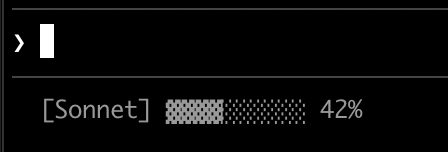
Phần tiêu đề “Context window usage”Hiện model hiện tại và context window usage với progress bar trực quan. Mỗi script đọc JSON từ stdin, trích field used_percentage, và dựng một bar 10 ký tự với khối đã tô (▓) đại diện phần đã dùng:
#!/bin/bash# Đọc toàn bộ stdin vào biếninput=$(cat)
# Trích field bằng jq, "// 0" là fallback cho nullMODEL=$(echo "$input" | jq -r '.model.display_name')PCT=$(echo "$input" | jq -r '.context_window.used_percentage // 0' | cut -d. -f1)
# Dựng progress bar: printf -v tạo chuỗi dấu cách, rồi# ${var// /▓} thay mỗi dấu cách bằng ký tự khốiBAR_WIDTH=10FILLED=$((PCT * BAR_WIDTH / 100))EMPTY=$((BAR_WIDTH - FILLED))BAR=""[ "$FILLED" -gt 0 ] && printf -v FILL "%${FILLED}s" && BAR="${FILL// /▓}"[ "$EMPTY" -gt 0 ] && printf -v PAD "%${EMPTY}s" && BAR="${BAR}${PAD// /░}"
echo "[$MODEL] $BAR $PCT%"
#!/usr/bin/env python3import json, sys
# json.load đọc và parse stdin trong một bướcdata = json.load(sys.stdin)model = data['model']['display_name']# "or 0" xử lý giá trị nullpct = int(data.get('context_window', {}).get('used_percentage', 0) or 0)
# Nhân chuỗi để dựng barfilled = pct * 10 // 100bar = '▓' * filled + '░' * (10 - filled)
print(f"[{model}] {bar} {pct}%")#!/usr/bin/env node// Node.js đọc stdin bất đồng bộ bằng eventlet input = '';process.stdin.on('data', chunk => input += chunk);process.stdin.on('end', () => { const data = JSON.parse(input); const model = data.model.display_name; // Optional chaining (?.) xử lý an toàn field null const pct = Math.floor(data.context_window?.used_percentage || 0);
// String.repeat() dựng bar const filled = Math.floor(pct * 10 / 100); const bar = '▓'.repeat(filled) + '░'.repeat(10 - filled);
console.log(`[${model}] ${bar} ${pct}%`);});Git status kèm màu
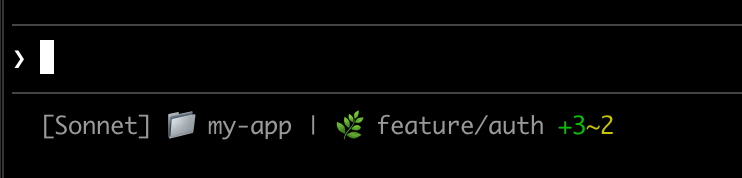
Phần tiêu đề “Git status kèm màu”Hiện git branch với chỉ báo màu cho file staged và modified. Script dùng mã ANSI escape cho màu terminal: \033[32m là xanh lá, \033[33m là vàng, \033[0m reset về mặc định.
Mỗi script kiểm tra thư mục hiện tại có phải git repository không, đếm file staged/modified, rồi hiện chỉ báo có màu:
#!/bin/bashinput=$(cat)
MODEL=$(echo "$input" | jq -r '.model.display_name')DIR=$(echo "$input" | jq -r '.workspace.current_dir')
GREEN='\033[32m'YELLOW='\033[33m'RESET='\033[0m'
if git rev-parse --git-dir > /dev/null 2>&1; then    BRANCH=$(git branch --show-current 2>/dev/null)    STAGED=$(git diff --cached --numstat 2>/dev/null | wc -l | tr -d ' ')    MODIFIED=$(git diff --numstat 2>/dev/null | wc -l | tr -d ' ')
    GIT_STATUS=""    [ "$STAGED" -gt 0 ] && GIT_STATUS="${GREEN}+${STAGED}${RESET}"    [ "$MODIFIED" -gt 0 ] && GIT_STATUS="${GIT_STATUS}${YELLOW}~${MODIFIED}${RESET}"
    echo -e "[$MODEL] 📁 ${DIR##*/} | 🌿 $BRANCH $GIT_STATUS"else    echo "[$MODEL] 📁 ${DIR##*/}"fi
#!/usr/bin/env python3import json, sys, subprocess, os
data = json.load(sys.stdin)model = data['model']['display_name']directory = os.path.basename(data['workspace']['current_dir'])
GREEN, YELLOW, RESET = '\033[32m', '\033[33m', '\033[0m'
try: subprocess.check_output(['git', 'rev-parse', '--git-dir'], stderr=subprocess.DEVNULL) branch = subprocess.check_output(['git', 'branch', '--show-current'], text=True).strip() staged_output = subprocess.check_output(['git', 'diff', '--cached', '--numstat'], text=True).strip() modified_output = subprocess.check_output(['git', 'diff', '--numstat'], text=True).strip() staged = len(staged_output.split('\n')) if staged_output else 0 modified = len(modified_output.split('\n')) if modified_output else 0
git_status = f"{GREEN}+{staged}{RESET}" if staged else "" git_status += f"{YELLOW}~{modified}{RESET}" if modified else ""
print(f"[{model}] 📁 {directory} | 🌿 {branch} {git_status}")except: print(f"[{model}] 📁 {directory}")#!/usr/bin/env nodeconst { execSync } = require('child_process');const path = require('path');
let input = '';process.stdin.on('data', chunk => input += chunk);process.stdin.on('end', () => { const data = JSON.parse(input); const model = data.model.display_name; const dir = path.basename(data.workspace.current_dir);
const GREEN = '\x1b[32m', YELLOW = '\x1b[33m', RESET = '\x1b[0m';
try { execSync('git rev-parse --git-dir', { stdio: 'ignore' }); const branch = execSync('git branch --show-current', { encoding: 'utf8' }).trim(); const staged = execSync('git diff --cached --numstat', { encoding: 'utf8' }).trim().split('\n').filter(Boolean).length; const modified = execSync('git diff --numstat', { encoding: 'utf8' }).trim().split('\n').filter(Boolean).length;
let gitStatus = staged ? `${GREEN}+${staged}${RESET}` : ''; gitStatus += modified ? `${YELLOW}~${modified}${RESET}` : '';
console.log(`[${model}] 📁 ${dir} | 🌿 ${branch} ${gitStatus}`); } catch { console.log(`[${model}] 📁 ${dir}`); }});Theo dõi chi phí và thời lượng
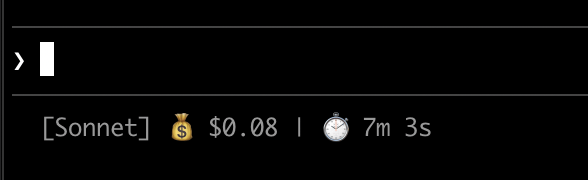
Phần tiêu đề “Theo dõi chi phí và thời lượng”Track chi phí API và thời gian trôi qua của phiên. Field cost.total_cost_usd cộng dồn chi phí ước tính của mọi API call trong phiên hiện tại. cost.total_duration_ms đo tổng thời gian thực tế kể từ khi phiên bắt đầu, còn cost.total_api_duration_ms chỉ tính thời gian chờ phản hồi API.
Mỗi script format chi phí thành tiền tệ và đổi mili-giây sang phút, giây:
#!/bin/bashinput=$(cat)
MODEL=$(echo "$input" | jq -r '.model.display_name')COST=$(echo "$input" | jq -r '.cost.total_cost_usd // 0')DURATION_MS=$(echo "$input" | jq -r '.cost.total_duration_ms // 0')
COST_FMT=$(printf '$%.2f' "$COST")DURATION_SEC=$((DURATION_MS / 1000))MINS=$((DURATION_SEC / 60))SECS=$((DURATION_SEC % 60))
echo "[$MODEL] 💰 $COST_FMT | ⏱️ ${MINS}m ${SECS}s"
#!/usr/bin/env python3import json, sys
data = json.load(sys.stdin)model = data['model']['display_name']cost = data.get('cost', {}).get('total_cost_usd', 0) or 0duration_ms = data.get('cost', {}).get('total_duration_ms', 0) or 0
duration_sec = duration_ms // 1000mins, secs = duration_sec // 60, duration_sec % 60
print(f"[{model}] 💰 ${cost:.2f} | ⏱️ {mins}m {secs}s")#!/usr/bin/env nodelet input = '';process.stdin.on('data', chunk => input += chunk);process.stdin.on('end', () => { const data = JSON.parse(input); const model = data.model.display_name; const cost = data.cost?.total_cost_usd || 0; const durationMs = data.cost?.total_duration_ms || 0;
const durationSec = Math.floor(durationMs / 1000); const mins = Math.floor(durationSec / 60); const secs = durationSec % 60;
console.log(`[${model}] 💰 $${cost.toFixed(2)} | ⏱️ ${mins}m ${secs}s`);});Hiện nhiều dòng
Phần tiêu đề “Hiện nhiều dòng”Script của bạn có thể output nhiều dòng để tạo hiển thị phong phú hơn. Mỗi lệnh echo tạo một hàng riêng trong khu vực status.
Ví dụ này kết hợp vài kỹ thuật: màu theo ngưỡng (xanh lá dưới 70%, vàng 70-89%, đỏ 90%+), progress bar, và thông tin git branch:
#!/bin/bashinput=$(cat)
MODEL=$(echo "$input" | jq -r '.model.display_name')DIR=$(echo "$input" | jq -r '.workspace.current_dir')COST=$(echo "$input" | jq -r '.cost.total_cost_usd // 0')PCT=$(echo "$input" | jq -r '.context_window.used_percentage // 0' | cut -d. -f1)DURATION_MS=$(echo "$input" | jq -r '.cost.total_duration_ms // 0')
CYAN='\033[36m'; GREEN='\033[32m'; YELLOW='\033[33m'; RED='\033[31m'; RESET='\033[0m'
# Chọn màu bar theo mức context usageif [ "$PCT" -ge 90 ]; then BAR_COLOR="$RED"elif [ "$PCT" -ge 70 ]; then BAR_COLOR="$YELLOW"else BAR_COLOR="$GREEN"; fi
FILLED=$((PCT / 10)); EMPTY=$((10 - FILLED))printf -v FILL "%${FILLED}s"; printf -v PAD "%${EMPTY}s"BAR="${FILL// /█}${PAD// /░}"
MINS=$((DURATION_MS / 60000)); SECS=$(((DURATION_MS % 60000) / 1000))
BRANCH=""git rev-parse --git-dir > /dev/null 2>&1 && BRANCH=" | 🌿 $(git branch --show-current 2>/dev/null)"
echo -e "${CYAN}[$MODEL]${RESET} 📁 ${DIR##*/}$BRANCH"COST_FMT=$(printf '$%.2f' "$COST")echo -e "${BAR_COLOR}${BAR}${RESET} ${PCT}% | ${YELLOW}${COST_FMT}${RESET} | ⏱️ ${MINS}m ${SECS}s"
#!/usr/bin/env python3import json, sys, subprocess, os
data = json.load(sys.stdin)model = data['model']['display_name']directory = os.path.basename(data['workspace']['current_dir'])cost = data.get('cost', {}).get('total_cost_usd', 0) or 0pct = int(data.get('context_window', {}).get('used_percentage', 0) or 0)duration_ms = data.get('cost', {}).get('total_duration_ms', 0) or 0
CYAN, GREEN, YELLOW, RED, RESET = '\033[36m', '\033[32m', '\033[33m', '\033[31m', '\033[0m'
bar_color = RED if pct >= 90 else YELLOW if pct >= 70 else GREENfilled = pct // 10bar = '█' * filled + '░' * (10 - filled)
mins, secs = duration_ms // 60000, (duration_ms % 60000) // 1000
try: branch = subprocess.check_output(['git', 'branch', '--show-current'], text=True, stderr=subprocess.DEVNULL).strip() branch = f" | 🌿 {branch}" if branch else ""except: branch = ""
print(f"{CYAN}[{model}]{RESET} 📁 {directory}{branch}")print(f"{bar_color}{bar}{RESET} {pct}% | {YELLOW}${cost:.2f}{RESET} | ⏱️ {mins}m {secs}s")#!/usr/bin/env nodeconst { execSync } = require('child_process');const path = require('path');
let input = '';process.stdin.on('data', chunk => input += chunk);process.stdin.on('end', () => { const data = JSON.parse(input); const model = data.model.display_name; const dir = path.basename(data.workspace.current_dir); const cost = data.cost?.total_cost_usd || 0; const pct = Math.floor(data.context_window?.used_percentage || 0); const durationMs = data.cost?.total_duration_ms || 0;
const CYAN = '\x1b[36m', GREEN = '\x1b[32m', YELLOW = '\x1b[33m', RED = '\x1b[31m', RESET = '\x1b[0m';
const barColor = pct >= 90 ? RED : pct >= 70 ? YELLOW : GREEN; const filled = Math.floor(pct / 10); const bar = '█'.repeat(filled) + '░'.repeat(10 - filled);
const mins = Math.floor(durationMs / 60000); const secs = Math.floor((durationMs % 60000) / 1000);
let branch = ''; try { branch = execSync('git branch --show-current', { encoding: 'utf8', stdio: ['pipe', 'pipe', 'ignore'] }).trim(); branch = branch ? ` | 🌿 ${branch}` : ''; } catch {}
console.log(`${CYAN}[${model}]${RESET} 📁 ${dir}${branch}`); console.log(`${barColor}${bar}${RESET} ${pct}% | ${YELLOW}$${cost.toFixed(2)}${RESET} | ⏱️ ${mins}m ${secs}s`);});Link có thể click
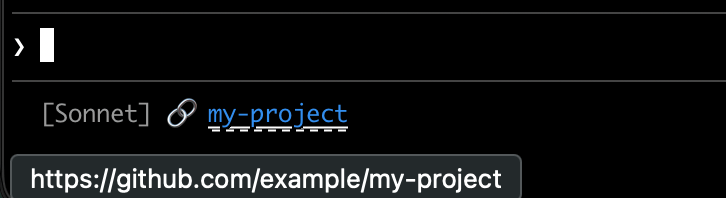
Phần tiêu đề “Link có thể click”Ví dụ này tạo một link có thể click tới GitHub repository của bạn. Script đọc URL git remote, đổi định dạng SSH sang HTTPS bằng sed, và bọc tên repo trong OSC 8 escape code. Giữ Cmd (macOS) hoặc Ctrl (Windows/Linux) rồi click để mở link trên trình duyệt.
Bản Bash dùng printf '%b', vốn xử lý backslash escape đáng tin cậy hơn echo -e giữa các shell khác nhau:
#!/bin/bashinput=$(cat)
MODEL=$(echo "$input" | jq -r '.model.display_name')
# Đổi git SSH URL sang HTTPSREMOTE=$(git remote get-url origin 2>/dev/null | sed 's/git@github.com:/https:\/\/github.com\//' | sed 's/\.git$//')
if [ -n "$REMOTE" ]; then    REPO_NAME=$(basename "$REMOTE")    # Định dạng OSC 8: \e]8;;URL\a rồi TEXT rồi \e]8;;\a    # printf %b xử lý escape sequence đáng tin cậy giữa các shell    printf '%b' "[$MODEL] 🔗 \e]8;;${REMOTE}\a${REPO_NAME}\e]8;;\a\n"else    echo "[$MODEL]"fi
#!/usr/bin/env python3import json, sys, subprocess, re, os
data = json.load(sys.stdin)model = data['model']['display_name']
# Lấy URL git remotetry: remote = subprocess.check_output( ['git', 'remote', 'get-url', 'origin'], stderr=subprocess.DEVNULL, text=True ).strip() # Đổi SSH sang HTTPS remote = re.sub(r'^git@github\.com:', 'https://github.com/', remote) remote = re.sub(r'\.git$', '', remote) repo_name = os.path.basename(remote) # OSC 8 escape sequence link = f"\033]8;;{remote}\a{repo_name}\033]8;;\a" print(f"[{model}] 🔗 {link}")except: print(f"[{model}]")#!/usr/bin/env nodeconst { execSync } = require('child_process');const path = require('path');
let input = '';process.stdin.on('data', chunk => input += chunk);process.stdin.on('end', () => { const data = JSON.parse(input); const model = data.model.display_name;
try { let remote = execSync('git remote get-url origin', { encoding: 'utf8', stdio: ['pipe', 'pipe', 'ignore'] }).trim(); // Đổi SSH sang HTTPS remote = remote.replace(/^git@github\.com:/, 'https://github.com/').replace(/\.git$/, ''); const repoName = path.basename(remote); // OSC 8 escape sequence const link = `\x1b]8;;${remote}\x07${repoName}\x1b]8;;\x07`; console.log(`[${model}] 🔗 ${link}`); } catch { console.log(`[${model}]`); }});Rate limit usage
Phần tiêu đề “Rate limit usage”Hiện rate limit usage của subscription Claude.ai trong status line. Object rate_limits gồm five_hour (window 5 giờ) và seven_day (window 7 ngày). Mỗi window có used_percentage (0-100) và resets_at (Unix epoch giây khi window reset).
Field này chỉ có với subscriber Claude.ai (Pro/Max) sau API response đầu tiên. Mỗi script xử lý an toàn khi field vắng mặt:
#!/bin/bashinput=$(cat)
MODEL=$(echo "$input" | jq -r '.model.display_name')# "// empty" không in gì khi rate_limits vắng mặtFIVE_H=$(echo "$input" | jq -r '.rate_limits.five_hour.used_percentage // empty')WEEK=$(echo "$input" | jq -r '.rate_limits.seven_day.used_percentage // empty')
LIMITS=""[ -n "$FIVE_H" ] && LIMITS="5h: $(printf '%.0f' "$FIVE_H")%"[ -n "$WEEK" ] && LIMITS="${LIMITS:+$LIMITS }7d: $(printf '%.0f' "$WEEK")%"
[ -n "$LIMITS" ] && echo "[$MODEL] | $LIMITS" || echo "[$MODEL]"
#!/usr/bin/env python3import json, sys
data = json.load(sys.stdin)model = data['model']['display_name']
parts = []rate = data.get('rate_limits', {})five_h = rate.get('five_hour', {}).get('used_percentage')week = rate.get('seven_day', {}).get('used_percentage')
if five_h is not None: parts.append(f"5h: {five_h:.0f}%")if week is not None: parts.append(f"7d: {week:.0f}%")
if parts: print(f"[{model}] | {' '.join(parts)}")else: print(f"[{model}]")#!/usr/bin/env nodelet input = '';process.stdin.on('data', chunk => input += chunk);process.stdin.on('end', () => { const data = JSON.parse(input); const model = data.model.display_name;
const parts = []; const fiveH = data.rate_limits?.five_hour?.used_percentage; const week = data.rate_limits?.seven_day?.used_percentage;
if (fiveH != null) parts.push(`5h: ${Math.round(fiveH)}%`); if (week != null) parts.push(`7d: ${Math.round(week)}%`);
console.log(parts.length ? `[${model}] | ${parts.join(' ')}` : `[${model}]`);});Cache các thao tác tốn kém
Phần tiêu đề “Cache các thao tác tốn kém”Script status line của bạn chạy thường xuyên trong lúc phiên đang hoạt động. Lệnh như git status hoặc git diff có thể chậm, nhất là ở repository lớn. Ví dụ này cache thông tin git vào file tạm và chỉ refresh mỗi 5 giây.
Tên file cache cần ổn định giữa các lần gọi status line trong cùng một phiên, nhưng duy nhất giữa các phiên để các phiên chạy đồng thời ở repository khác nhau không đọc trạng thái git của nhau. Định danh theo process như $$, os.getpid(), hay process.pid đổi ở mỗi lần gọi và làm hỏng cache - dùng session_id từ JSON input thay vào đó: nó ổn định suốt vòng đời phiên và duy nhất theo phiên.
Mỗi script kiểm tra file cache thiếu hoặc cũ hơn 5 giây trước khi chạy lệnh git:
#!/bin/bashinput=$(cat)
MODEL=$(echo "$input" | jq -r '.model.display_name')DIR=$(echo "$input" | jq -r '.workspace.current_dir')SESSION_ID=$(echo "$input" | jq -r '.session_id')
CACHE_FILE="/tmp/statusline-git-cache-$SESSION_ID"CACHE_MAX_AGE=5  # giây
cache_is_stale() {    [ ! -f "$CACHE_FILE" ] || \    # stat -c %Y (Linux) hoặc stat -f %m (macOS) in ra thời gian sửa cuối.    # Dạng Linux phải chạy trước: trên Linux, dạng macOS in ra một báo cáo    # filesystem ra stdout trước khi fail, và output đó sẽ bị command    # substitution bắt lại và làm hỏng phép tính.    [ $(($(date +%s) - $(stat -c %Y "$CACHE_FILE" 2>/dev/null || stat -f %m "$CACHE_FILE" 2>/dev/null || echo 0))) -gt $CACHE_MAX_AGE ]}
if cache_is_stale; then    if git rev-parse --git-dir > /dev/null 2>&1; then        BRANCH=$(git branch --show-current 2>/dev/null)        STAGED=$(git diff --cached --numstat 2>/dev/null | wc -l | tr -d ' ')        MODIFIED=$(git diff --numstat 2>/dev/null | wc -l | tr -d ' ')        echo "$BRANCH|$STAGED|$MODIFIED" > "$CACHE_FILE"    else        echo "||" > "$CACHE_FILE"    fifi
IFS='|' read -r BRANCH STAGED MODIFIED < "$CACHE_FILE"
if [ -n "$BRANCH" ]; then    echo "[$MODEL] 📁 ${DIR##*/} | 🌿 $BRANCH +$STAGED ~$MODIFIED"else    echo "[$MODEL] 📁 ${DIR##*/}"fi
#!/usr/bin/env python3import json, sys, subprocess, os, time
data = json.load(sys.stdin)model = data['model']['display_name']directory = os.path.basename(data['workspace']['current_dir'])session_id = data['session_id']
CACHE_FILE = f"/tmp/statusline-git-cache-{session_id}"CACHE_MAX_AGE = 5 # giây
def cache_is_stale(): if not os.path.exists(CACHE_FILE): return True return time.time() - os.path.getmtime(CACHE_FILE) > CACHE_MAX_AGE
if cache_is_stale(): try: subprocess.check_output(['git', 'rev-parse', '--git-dir'], stderr=subprocess.DEVNULL) branch = subprocess.check_output(['git', 'branch', '--show-current'], text=True).strip() staged = subprocess.check_output(['git', 'diff', '--cached', '--numstat'], text=True).strip() modified = subprocess.check_output(['git', 'diff', '--numstat'], text=True).strip() staged_count = len(staged.split('\n')) if staged else 0 modified_count = len(modified.split('\n')) if modified else 0 with open(CACHE_FILE, 'w') as f: f.write(f"{branch}|{staged_count}|{modified_count}") except: with open(CACHE_FILE, 'w') as f: f.write("||")
with open(CACHE_FILE) as f: branch, staged, modified = f.read().strip().split('|')
if branch: print(f"[{model}] 📁 {directory} | 🌿 {branch} +{staged} ~{modified}")else: print(f"[{model}] 📁 {directory}")#!/usr/bin/env nodeconst { execSync } = require('child_process');const fs = require('fs');const path = require('path');
let input = '';process.stdin.on('data', chunk => input += chunk);process.stdin.on('end', () => { const data = JSON.parse(input); const model = data.model.display_name; const dir = path.basename(data.workspace.current_dir); const sessionId = data.session_id;
const CACHE_FILE = `/tmp/statusline-git-cache-${sessionId}`; const CACHE_MAX_AGE = 5; // giây
const cacheIsStale = () => { if (!fs.existsSync(CACHE_FILE)) return true; return (Date.now() / 1000) - fs.statSync(CACHE_FILE).mtimeMs / 1000 > CACHE_MAX_AGE; };
if (cacheIsStale()) { try { execSync('git rev-parse --git-dir', { stdio: 'ignore' }); const branch = execSync('git branch --show-current', { encoding: 'utf8' }).trim(); const staged = execSync('git diff --cached --numstat', { encoding: 'utf8' }).trim().split('\n').filter(Boolean).length; const modified = execSync('git diff --numstat', { encoding: 'utf8' }).trim().split('\n').filter(Boolean).length; fs.writeFileSync(CACHE_FILE, `${branch}|${staged}|${modified}`); } catch { fs.writeFileSync(CACHE_FILE, '||'); } }
const [branch, staged, modified] = fs.readFileSync(CACHE_FILE, 'utf8').trim().split('|');
if (branch) { console.log(`[${model}] 📁 ${dir} | 🌿 ${branch} +${staged} ~${modified}`); } else { console.log(`[${model}] 📁 ${dir}`); }});Cấu hình Windows
Phần tiêu đề “Cấu hình Windows”Trên Windows, Claude Code chạy lệnh status line qua Git Bash khi đã cài Git Bash, hoặc qua PowerShell khi không có Git Bash.
Git Bash coi backslash không quote là ký tự escape, nên một đường dẫn kiểu Windows như C:\Users\username\script.mjs tới script runner với dấu phân cách bị xoá mất, và lệnh fail mà không báo lỗi rõ ràng. Viết đường dẫn file trong chuỗi command bằng forward slash, như các ví dụ dưới. Cách viết tắt ~ cũng dùng được và mở rộng thành thư mục home Windows của bạn.
Để chạy một script PowerShell làm status line, gọi nó qua powershell - cách này hoạt động dù Claude Code route command qua Git Bash hay PowerShell:
{ "statusLine": { "type": "command", "command": "powershell -NoProfile -File C:/Users/username/.claude/statusline.ps1" }}$input_json = $input | Out-String | ConvertFrom-Json$cwd = $input_json.cwd$model = $input_json.model.display_name$used = $input_json.context_window.used_percentage$dirname = Split-Path $cwd -Leaf
if ($used) { Write-Host "$dirname [$model] ctx: $used%"} else { Write-Host "$dirname [$model]"}Hoặc, khi đã cài Git Bash, chạy trực tiếp một script Bash:
{ "statusLine": { "type": "command", "command": "~/.claude/statusline.sh" }}#!/usr/bin/env bashinput=$(cat)cwd=$(echo "$input" | grep -o '"cwd":"[^"]*"' | cut -d'"' -f4)model=$(echo "$input" | grep -o '"display_name":"[^"]*"' | cut -d'"' -f4)dirname="${cwd##*[/\\]}"echo "$dirname [$model]"Status line cho subagent
Phần tiêu đề “Status line cho subagent”Setting subagentStatusLine render một hàng nội dung tuỳ chỉnh cho mỗi subagent hiển thị trong agent panel dưới prompt. Dùng để thay hàng mặc định name · description · token count bằng định dạng riêng của bạn.
{ "subagentStatusLine": { "type": "command", "command": "~/.claude/subagent-statusline.sh" }}Command chạy một lần mỗi refresh tick và nhận toàn bộ hàng subagent đang hiển thị dưới dạng một object JSON qua stdin. Input gồm các field hook cơ bản, field columns cho độ rộng hàng khả dụng, và một mảng tasks. Mỗi task có id, name, type, status, description, label, startTime, model, effort, contextWindowSize, tokenCount, tokenSamples, và cwd.
Field model theo từng task là model ID đã resolve mà task đó chạy trên. contextWindowSize là context window (tính bằng token) của model đó, tính theo cùng cách với context_window.context_window_size của status line chính, nên bạn có thể render phần trăm theo từng hàng từ tokenCount. Cả hai field yêu cầu Claude Code v2.1.205 trở lên và bị bỏ qua với task chưa resolve model.
Field effort theo từng task là reasoning effort đặt cho subagent đó, trong frontmatter định nghĩa hoặc ở lần gọi riêng lẻ. Giá trị là một trong các chuỗi effort level low, medium, high, xhigh, max, hoặc một token budget dạng số. Field này báo đúng giá trị đã cấu hình: nếu model không hỗ trợ level đó, effort thực tế Claude Code áp dụng có thể khác. Field yêu cầu v2.1.214 trở lên và vắng mặt khi subagent kế thừa effort level của phiên chính.
Ghi mỗi dòng JSON ra stdout cho mỗi hàng bạn muốn override, dạng {"id": "<task id>", "content": "<row body>"}. Chuỗi content được render nguyên trạng, gồm cả màu ANSI và OSC 8 hyperlink. Bỏ qua id của một task để giữ render mặc định cho hàng đó; gửi chuỗi content rỗng để ẩn nó.
Cùng cơ chế trust và disableAllHooks áp dụng cho statusLine cũng áp dụng ở đây. Plugin có thể ship một subagentStatusLine mặc định trong settings.json.
- Test bằng input giả:
echo '{"model":{"display_name":"Opus"},"workspace":{"current_dir":"/home/user/project"},"context_window":{"used_percentage":25},"session_id":"test-session-abc"}' | ./statusline.sh - Giữ output ngắn gọn: status bar có độ rộng giới hạn, output dài có thể bị cắt hoặc xuống dòng xấu
- Cache thao tác chậm: script chạy thường xuyên trong lúc phiên hoạt động, nên lệnh như
git statuscó thể gây lag - xem ví dụ caching
Các project cộng đồng như ccstatusline và starship-claude cung cấp cấu hình dựng sẵn với theme và tính năng bổ sung.
Xử lý sự cố
Phần tiêu đề “Xử lý sự cố”Status line không xuất hiện
- Kiểm tra script đã có quyền thực thi:
chmod +x ~/.claude/statusline.sh - Kiểm tra script output ra stdout, không phải stderr
- Chạy script thủ công để xác nhận nó có output
- Trên Windows với Git Bash, backslash trong đường dẫn
commandcó thể bị hiểu nhầm là ký tự escape trước khi script chạy - dùng forward slash. Xem Cấu hình Windows - Nếu
disableAllHooksđặttruetrong settings, status line cũng bị tắt theo - gỡ setting này hoặc đặtfalseđể bật lại - Chạy
claude --debugđể log exit code và stderr của lần gọi status line đầu tiên trong phiên - Nhờ Claude đọc file settings và tự chạy lệnh
statusLineđể lộ ra lỗi
Status line hiện -- hoặc giá trị rỗng
- Field có thể
nulltrước khi API response đầu tiên hoàn tất - Xử lý giá trị null trong script bằng fallback như
// 0trong jq - Restart Claude Code nếu giá trị vẫn rỗng sau nhiều tin nhắn
Context percentage hiện giá trị bất thường
- Dùng
used_percentageđể có trạng thái context chính xác đơn giản nhất - Context percentage có thể khác output
/contextdo thời điểm mỗi bên tính toán khác nhau
Link OSC 8 không click được
-
Kiểm tra terminal hỗ trợ OSC 8 hyperlink (iTerm2, Kitty, WezTerm)
-
Terminal.app không hỗ trợ link có thể click
-
Nếu text link hiện ra nhưng không click được, Claude Code có thể chưa phát hiện hỗ trợ hyperlink của terminal - thường gặp ở Windows Terminal và một số emulator ngoài danh sách auto-detect. Đặt biến môi trường
FORCE_HYPERLINKđể ghi đè detect trước khi chạy Claude Code:Terminal window FORCE_HYPERLINK=1 claudeTrong PowerShell, đặt biến trong phiên hiện tại trước:
Terminal window $env:FORCE_HYPERLINK = "1"; claude -
Phiên SSH và tmux có thể strip OSC sequence tuỳ cấu hình
-
Nếu escape sequence hiện dạng text literal như
\e]8;;, dùngprintf '%b'thay vìecho -eđể xử lý escape đáng tin cậy hơn
Lỗi hiển thị với escape sequence
- Escape sequence phức tạp (màu ANSI, link OSC 8) đôi khi gây output lỗi nếu chồng lên các UI update khác
- Nếu thấy text bị lỗi, thử đơn giản hoá script về plain text
- Status line nhiều dòng kèm escape code dễ gặp lỗi render hơn plain text một dòng
Yêu cầu workspace trust
- Command status line chỉ chạy nếu bạn đã chấp nhận dialog workspace trust cho thư mục hiện tại. Vì
statusLinethực thi shell command, nó cần cùng mức chấp nhận trust như hooks và các setting chạy shell khác - Nếu bạn chưa chấp nhận dialog workspace trust cho thư mục này, status line để trống, và
claude --debuglogStatus line command skipped: workspace trust not accepted. Restart Claude Code và chấp nhận dialog trust để bật
Script lỗi hoặc treo
- Script exit với mã khác 0 hoặc không có output làm status line trống
- Script chậm chặn status line cập nhật cho tới khi hoàn tất - giữ script nhanh để tránh output cũ
- Nếu một update mới kích hoạt trong khi script chậm đang chạy, script đang chạy dở bị huỷ
- Test script độc lập bằng input giả trước khi cấu hình
Notification chia sẻ hàng status line
- Thông báo hệ thống như lỗi MCP server và auto-update hiện ở bên phải cùng hàng với status line. Thông báo tạm thời như cảnh báo context-low cũng luân phiên qua khu vực này
- Bật verbose mode thêm token counter vào khu vực này
- Trên terminal hẹp, các thông báo này có thể cắt bớt output status line của bạn
lượt xem
